반응형
import cv2
import mediapipe as mp

# MediaPipe Pose 모델 초기화
mp_pose = mp.solutions.pose
mp_drawing = mp.solutions.drawing_utils

# 웹캠에서 영상 읽기
cap = cv2.VideoCapture(0)

# Pose 추정 모델 사용
with mp_pose.Pose(min_detection_confidence=0.5, min_tracking_confidence=0.5) as pose:
    while cap.isOpened():
        ret, frame = cap.read()
        if not ret:
            break

        # BGR 이미지를 RGB로 변환
        image = cv2.cvtColor(frame, cv2.COLOR_BGR2RGB)
        image.flags.writeable = False

        # Pose 추정 수행
        results = pose.process(image)

        # 이미지에 스켈레톤 그리기
        image.flags.writeable = True
        image = cv2.cvtColor(image, cv2.COLOR_RGB2BGR)
        if results.pose_landmarks:
            mp_drawing.draw_landmarks(
                image, results.pose_landmarks, mp_pose.POSE_CONNECTIONS,
                mp_drawing.DrawingSpec(color=(0, 255, 0), thickness=2, circle_radius=2),
                mp_drawing.DrawingSpec(color=(0, 0, 255), thickness=2, circle_radius=2)
            )

        # 결과 이미지 표시
        cv2.imshow('Skeleton Pose Estimation', image)

        # 'q' 키를 누르면 종료
        if cv2.waitKey(10) & 0xFF == ord('q'):
            break

# 리소스 해제
cap.release()
cv2.destroyAllWindows()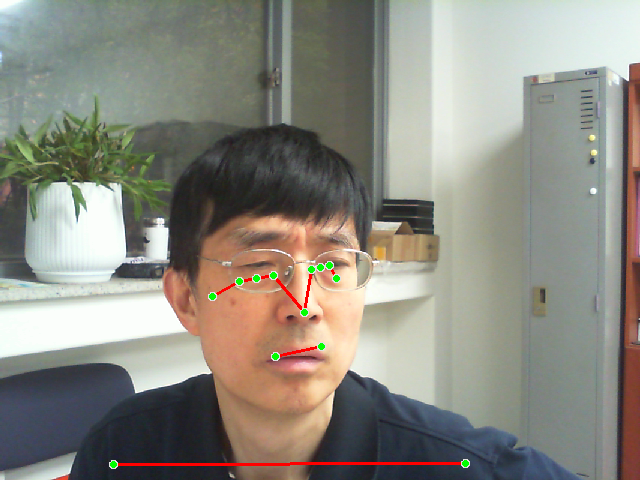
반응형
'라즈베리파이' 카테고리의 다른 글
| harris.py (0) | 2025.09.20 |
|---|---|
| laplacian.py (0) | 2025.09.20 |
| point_mediapipe.py (0) | 2025.09.19 |
| sobel.py (0) | 2025.09.19 |
| 라즈베리파이 5에서 tensorflow가 설치된 opencv 개발환경 설정 (0) | 2025.09.19 |